



GM RemoteLink Now Available on Windows Phones
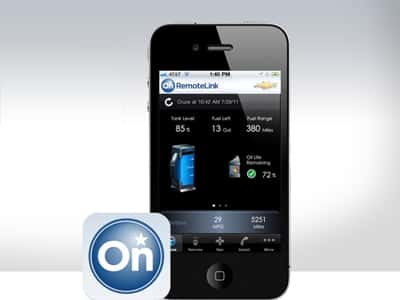 Windows phone owners around Bradenton and Tampa rejoice; you can now use the RemoteLink App to connect with your Chevy, a feature formerly just enjoyed by iPhone, Android, and Blackberry owners. The app is available to select models operating Windows 7 and 8 operating systems and can be obtained through the Windows Phone Store.
So, you’re probably asking what RemoteLink exactly does. We live in the age of connectivity, and while that may more accurately describe our dependency on our smartphones rather on what they can do, RemoteLink allows you to connect with your Chevy vehicle in a wide range of useful ways.
Features accessed right from your phone include:
- Lock and unlock
- Remote start
- Horn and lights alert, as well as an easy “stop horn and light” function
- The ability to send directional information right to your car’s navigation system
- Vehicle diagnostic information, including fuel level, remaining vehicle range, fuel economy, tire pressure, motor oil life, and more
- Connect to an OnStar advisor anytime, anywhere
- Think this sounds too good to be true? RemoteLink is available on most Chevy and other GM vehicles, so most drivers can enjoy the benefits of this great tech.
Just Another Great Feature from Chevy
Detroit has stepped up its game in the last few years, and Chevy is leading the pack. A great list of modern features has helped make cars like the 2014 Cruze compact and the 2014 Impala some of the most sought after vehicles in their class. Onboard features often include Bluetooth hands free calling, steering wheel mounted audio controls, and automatic climate control.
If you would like to learn more about how Chevy is keeping drivers connected, we encourage you to visit Cox Chevy in Bradenton. We’re located at 2900 Cortez Road West, just a short trip from many communities around the Suncoast. Have questions, feel free to give us a call!




0 comment(s) so far on GM RemoteLink Now Available on Windows Phones